Each year that your Xbox LIVE membership needs to be renewed and you have a credit card on file with us, we automatically renew the account. We’ve heard from some members that, for a variety of reasons, they’d like the option to turn this off. I am going to show you how to do this in a few easy steps.
- Sign in to Xbox.com and go to the My Account section.
- Click the Membership level link on the left.
- You’ll see a page that has your Membership level, and the end date. Under that, you’ll see your “Automatic Renewal” status.
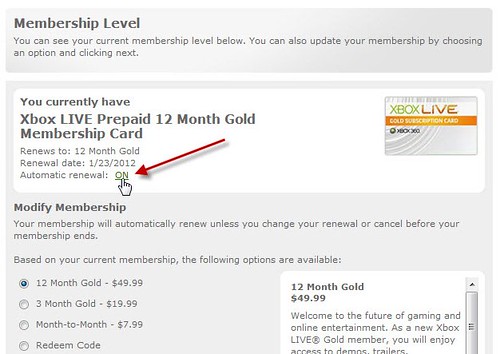
- If it reads ON (like the screenshot above) You can click the ON link and you’ll be brought to next page that will let you switch it on or off. (screenshot)
- Make your selection, then click next.
- You’ll be returned to your Membership level page, where you can confirm your selection (screenshot)
Hopefully, that will help
